
Let me clear something up first. I don’t have ADHD. My attention isn’t especially prone to wandering.
But somewhere along the way of swapping one to-do method for another, I noticed something odd. Methods designed for ADHD simply work better for me. I focus better than I do with mainstream productivity advice, and, more to the point, the habit lasts.
I assumed it was a lucky fit. When I looked into why, the reason turned out to be fairly plain.
Designed for ADHD Means Designed Without Willpower
Most productivity systems rest on a quiet assumption: a diligent user.
Someone who records everything every day, tidies up on schedule, and remembers the rules well enough to follow them. That is the person the system is built for.
Methods adapted for ADHD remove that assumption. They don’t rely on memory, they don’t rely on willpower, and they recover gracefully after you fall behind. They aren’t a crutch for people who lack discipline. They take discipline out of the equation entirely.
So a disciplined person loses nothing by using them. If anything, the discipline is freed up for something else.
Think of the ramp at the edge of a sidewalk. It was built for wheelchairs, but strollers, rolling suitcases, and delivery carts all use it. A design that removes the step is simply easier, even for people who could have managed the step. I think tools work the same way.
The Bullet Journal Was an ADHD Tool All Along
The Bullet Journal I use is a case in point. Its creator, Ryder Carroll, was diagnosed with attention deficit disorder as a child, and he built the Bullet Journal to fit his own restless mind. The person who designed the ramp was someone who needed it.
Still, even this method gets heavy if you follow every rule. Updating the index, setting up the future log and monthly pages, choosing the right symbol every time you write. Each piece is useful on its own, but keeping all of them going quietly brings the need for diligence right back.
Add the decorative spreads and templates that arrived with its popularity, and the load grows. The eight symbols I laid out in my earlier guide were part of that same accumulation.
Carroll himself describes the Bullet Journal not as a fixed format but as a method you adapt to your own needs. So what I did was neither a return to the original nor a rebellion against it. It was closer to subtracting the weight that didn’t fit me.
A Condition I Left Out Last Time
In The Bullet Journal Guide for People Tired of Digital To-Do Apps, I presented migration as one of the method’s smartest devices. Rewriting a postponed task by hand turns the tedium itself into a filter: unimportant tasks die of the reluctance to rewrite them.
Zero friction for checking, maximum friction for postponing. The point was never to eliminate friction, but to choose where to put it.
I still stand by that. But I left out one condition.
Friction works as a filter, but once the total passes a certain point, it stops being a filter and becomes a circuit breaker.
“Where to put friction” needed a companion question: “how much.” What I spent the past year doing wasn’t adding features. It was taking weight off.
What I Took Out
1. From Eight Symbols Down to Three
My earlier guide listed eight symbols: task, completed, migrated, waiting, event, note, idea, dismissed. Every one of them has a purpose. The trouble is that you have to classify before you can write.
Half a second spent deciding “is this a note or an idea?” while on the phone is enough to stop the writing altogether. The first requirement of a record isn’t accuracy. It’s getting written.
These days I use three.
| Symbol | Meaning |
|---|---|
| • | Task |
| × | Completed |
| > | Migrated |
Events, notes, and ideas all get a single dash (–) and no further classification. They’re either dealt with that day, or, if they’re worth keeping, they move to Obsidian.
2. The Future Log Went to My Calendar
This is not a matter of taste. It’s physics.
Paper doesn’t ring.
However neatly you write an appointment two months out in the future log, it doesn’t exist unless you happen to open that page on that day. A calendar schedules the reminder the moment you type it.
So I drew the line like this:
- Anything with a date or time → entered in my phone calendar on the spot, as I write it down
- Anything without one → paper
Pulling out a phone for ten seconds mid-note is a nuisance. It is considerably cheaper than cleaning up after one missed appointment.
3. I Let Go of the Index
The index is the first thing you learn in the Bullet Journal and the first thing you abandon. It only works if you keep page numbers and topics current, and the moment you fall one update behind, the index becomes wrong information. A wrong index is worse than no index.
Search is a contest paper was never going to win, so I handed that job to Obsidian (the setup is in The Obsidian PARA Method). Paper gives up on search and handles only the present.
4. I Don’t Look at the Whole Day’s List
Open a daily log and everything written for the day lands in your eyes at once. With ten lines in view, none of them gets started.
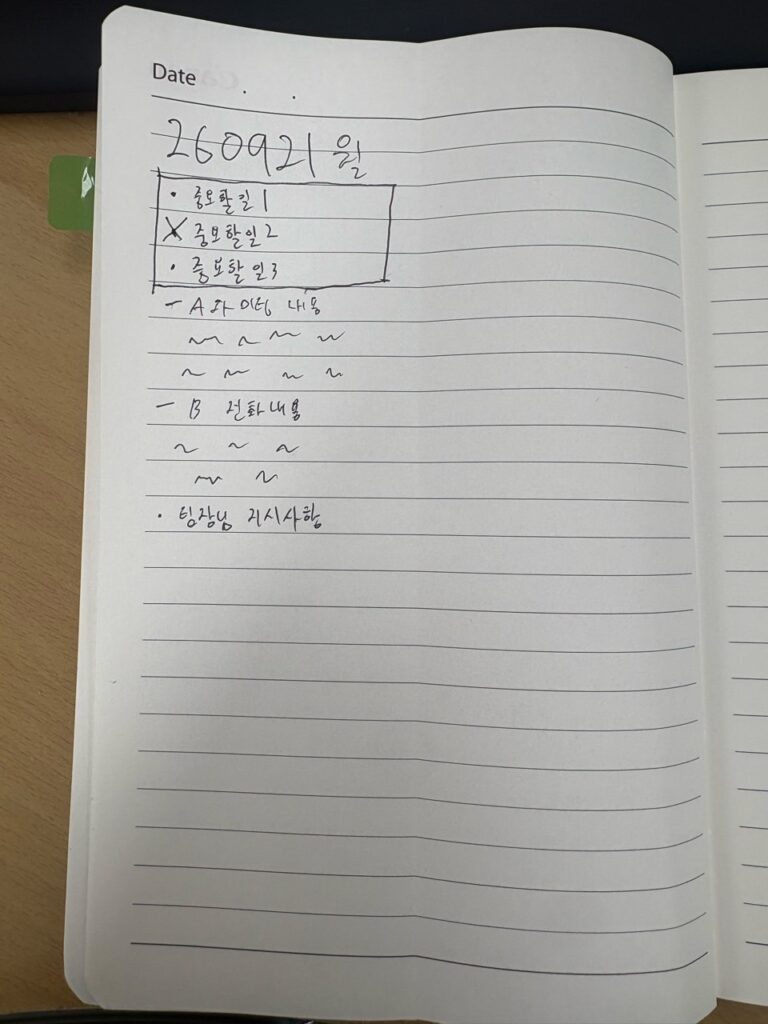
So I draw a box at the top of the page and write only the three things that must be finished today. The rest sits below, untouched, but the eye lands on those three lines first. Making only three things physically visible is more reliable than resolving to respect your priorities.
5. I Left the Monthly Blank
For a while I split my monthly page into four boxes, one for each week, each holding that week’s appointments and tasks. Eventually I noticed I almost never looked at it.
The reason was simple. It had the same resolution as my weekly plan.
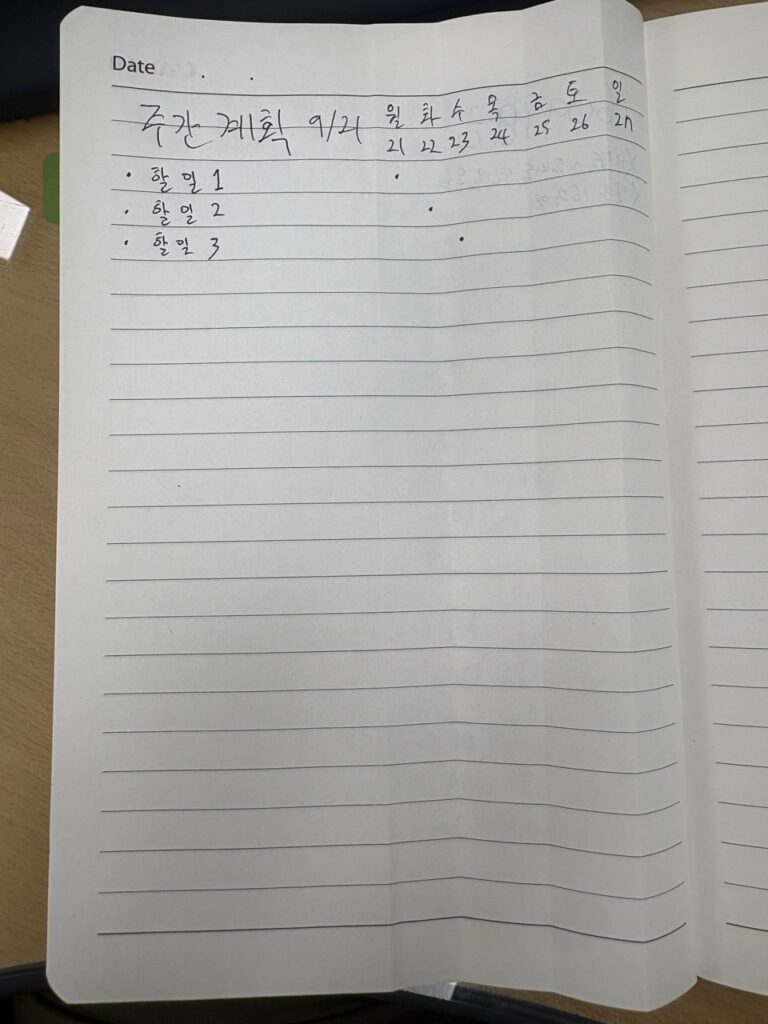
Here is how I do my weekly plan. I fold a page in half vertically. On the left, I list the week’s tasks. On the right, I draw seven columns, Monday through Sunday, and mark a dot under the day I’ll do each task. Tasks and scheduling, done on one page.
That meant the monthly’s week boxes were saying what the weekly already said. And of the two, the weekly was always the more current. Keep two pages at the same resolution, and one of them is bound to be a duplicate. The duplicate slowly goes stale. My monthly page was a stale weekly plan.
I wondered whether the monthly could hold something else instead. On reflection, there was nothing left for it. This week lives in the weekly grid, and anything dated beyond that lives in the calendar. The monthly had no job left to do.
So I leave the monthly without a fixed format. When I feel like looking back on the month, I write a reflection on a single page. Some months I skip it entirely. When a new month begins, there is no setup. I simply turn to the next weekly page.
What I Added
1. Anything With a Time Gets Written Twice
This is the calendar duplication from item 2 above. Paper alone isn’t enough, so items with a specific time also go into the calendar. Paper is where I remember. Reminding is the calendar’s job.
2. Paper and Obsidian Split the Work Instead of Trading It
When you use analog and digital together, you usually end up shuttling between them: copying paper notes into the computer, then ticking off on paper what you finished on the computer. I barely shuttle at all, because the two were given separate jobs from the start.
| Tool | Its job |
|---|---|
| Bullet Journal | Checking tasks, tasks that come up during the day, handwritten notes |
| Obsidian | Document work at the computer, start to finish |
Document work begins in Obsidian and ends in Obsidian. So at the end of the day, there is nothing to copy from paper to Obsidian. The only things that cross over are handwritten notes worth keeping, and even those move whenever I find the time, not on a schedule. (How the two halves fit together is in The CODE Method in Practice.)
The one fixed routine is in the morning. When I get to work, I skim the previous day’s page, copy today’s tasks and appointments from the weekly plan and the calendar into the daily log, and write today’s three at the top.
I don’t migrate unfinished lines to the next day before leaving. The next morning, I look at the previous day’s page. It’s right there.
The more paths you build between the two, the more often you ask, “Where did I write that?” Give each its own job, and that question has nowhere to arise.
The Day I Leave the Notebook Behind
It will happen. It is the weakest link in any analog system.
On those days, I write in whatever other notebook is at hand, and later I copy it into the real one.
Having two places to write, briefly, is fine. What matters is that there’s still only one place to look. Leave the second notebook uncopied and it becomes a second to-do list, and then begins the familiar “where did I write that?” At that point, the system built to remember things for you is making you do the remembering.
What Remains
After reading Mark Manson’s The Subtle Art of Not Giving a F*ck, I once wrote down a line of my own: the opposite of focus isn’t distraction. It’s caring about everything.
Tools, it turns out, are no different. Back when I was determined to do the Bullet Journal properly, with an index, a future log, and monthly pages all filled in, I failed to write down the things that actually needed writing. I was managing the method instead of the work.
I still don’t have ADHD. I simply rebuilt my notebook on the assumption that my willpower isn’t to be trusted, and only then did I make it through a full year. My notebook now starts on page one with nothing but a date. No index. Not especially pretty, either.